ACHIEVEMENT STANDARD ASSESSMENT
AS91883
Develop a computer program
Level 1, Credits 4, Internal Assessment
AUTHENTICITY REMINDER
It's important that any work handed in meets the requirements of authenticity. That means the work has not been a result of collusion, or plagarised. If you are in doubt about whether your work meets the authenticity requirements talk to your Learning Leader.
LEARNER EVIDENCE MUST BE SUBMITTED BY A DEADLINE
Hand in date (DEADLINE): must be complete before the End of the 2020 School Year. Allow 2 weeks for a resubmission (if it is offered).
The following must be handed in:
1. Learner has provided a video showing their program in operation. Video can be made using Screencastify found at the Chrome web store. The video link can be emailed to your learning leader ([email protected]).
2. Learners has provided a program file of their finished program. The file needs to be saved from the arcade.makecode.com editor. The saved file should be dragged to your Google Drive>11COD1 assessment folder for the AS91883 Coding assessment.
3. Learner has provided an assessment template document with their name and whanau class filled in. This document should also be in the Google Drive>11COD1 assessment folder for the AS91883 Coding assessment.
ASSESSMENT FOLDER
It's important in all Digital Technology work to have well organised folders and files. Folders and files need to have names that allow them to be located quickly. A common technique is to use a 'descriptive' name. A descriptive name describes in a few words the contents of the folder or file.
TASK
Go to your 11COD folder in your Alfriston College Google Drive.
Make an assessment folder. It should be named like this: "AS91878 and AS91883 Assessments - Your name". Your name should be your first and last name.
ASSESSMENT DOCUMENT FOR AS91883
The assessment has an instructions page which must be completed before starting the assessment.
TASK
Go to here to get the assessment document. You will need to be logged into your Alfriston College Google account.
Make a copy of it (File menu, Make a copy). Move the assessment document for AS91883 to your assessment folder for 11COD.
Fill in the details in the instructions - Your name, Whanau group etc.
DEVELOP A PROGRAM FOR AN ARCADE GAME USING ARCADE.MAKECODE
CONDITIONS OF ASSESSMENT
This is a project assessment (portfolio of evidence), and feedback can be sought from your learning leader. Feedback will mostly be general advice. The program developed must follow on from the design assessment. If students wish to do this assessment only then they must come up with an original idea and describe it in the assessment document.
Click the link for the Evidence Gathering Template
RESUBMISSIONS
Resubs are only offered if the learner has the opportunity to fix some work quite quickly and get a higher grade. If you are offered a resub and do change your work YOU MUST INFORM THE LEARNING LEADER by email. Mr Smirk's email address is [email protected]
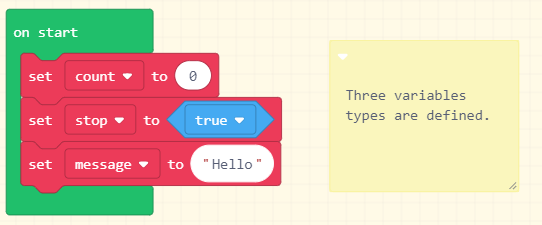
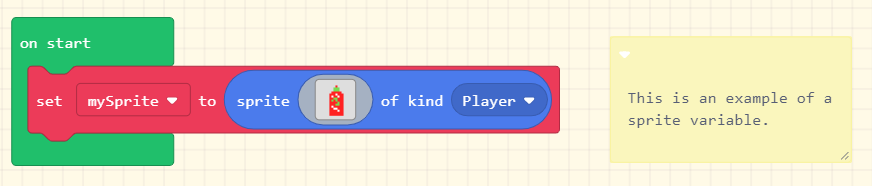
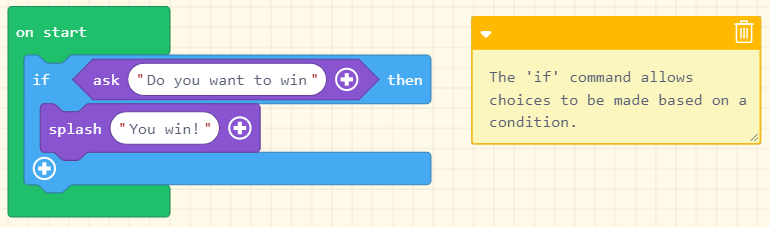
1. Write code for a program that performs a specified task using a suitable programming language
The task that the program performs is specified in the Code Assessment document. Click here to get a copy.
|
|
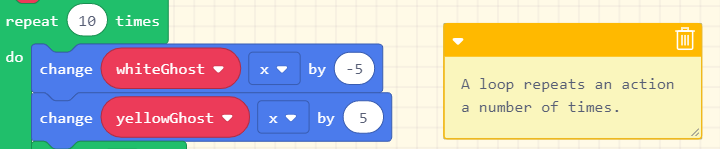
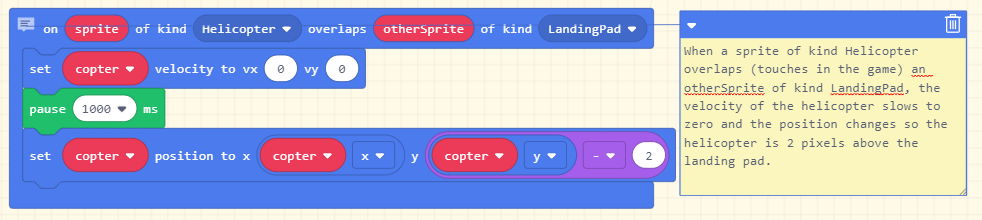
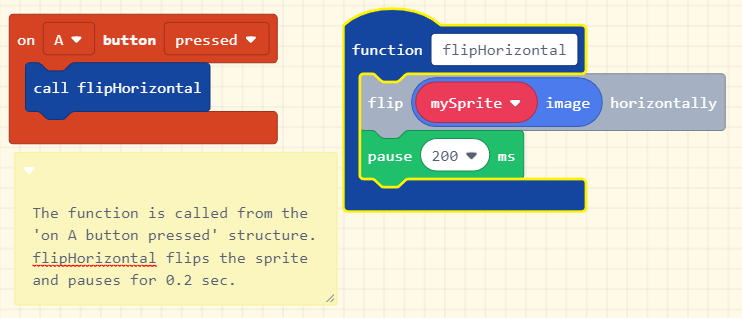
NOTES: It's important that all of the above programming structure are present in your program. They are required for a learner to pass with an Achieved grade. If you are having problems coming up with an original idea go to the 'Develop a Design' webpage here.
2. Set out the program code clearly
For a program's code to be clear it must organised in a way that enhances understanding.
Features of well organised code might include:
<> Set blocks used appropriately and put before the variables use.
<> Usually set blocks are at the beginning of a structure.
<> Unused code is removed.
<> Conditions are included in if statements.
<> Loops are used where there is repetition of statements in the code. This reduces the number of blocks of code.
<> Components of the program use a structure to group the code statements e.g. a function, on start, an overlap etc. A component of code should try to do just one programming task.
|
|
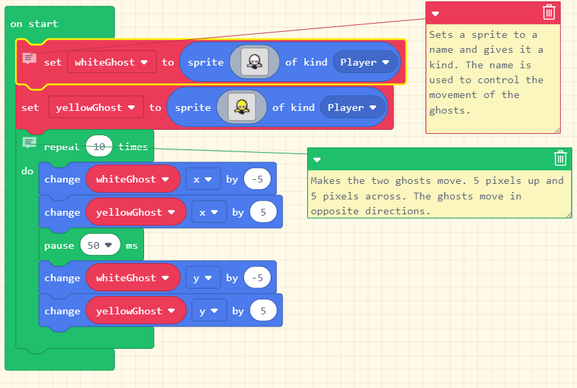
3. Document the program with comments
Comments are not executable. They don't change the way the program runs. Why use them? They are messages to the programmer (you) and anyone else who needs to look at your program (your learning leader, another teacher who might be a moderator etc.).
Comments are not needed for everything, as some things are self-explanatory. However comments that explain what you are trying to do with the code should be added as you write it.
How? It's as easy as a right-click on the block you want to comment on. You can also right-click on the background to add a general comment for the whole program.
4. Test and debug the program to ensure that it works on a sample of expected cases.
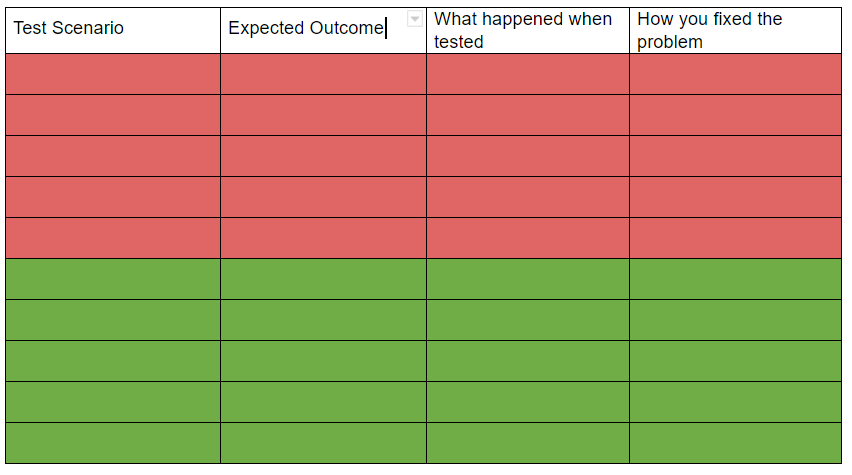
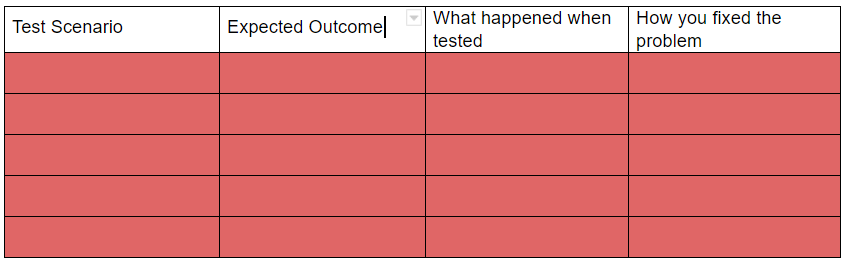
In the Code Assessment document there is a section at the end where tests of the code should be recorded. It's a good idea to fill it out as you go. Expected tests are any tests to get the code working as you expect it should work. These could be anything as everything you do is to try and get your code working as you would expect it to according to the specified task.
Your need to describe the test (Test Scenario), describe what you think will happen (Expected Outcome), describe what happened (What happened when tested), if the outcome wasn't the result you wanted describe what you did to fix it (How you fixed the problem).
For an achieved grade a minimum of 5 expected test cases is expected.
Achieved Grade: requirements 1- 4 are all that is necessary for an achieved grade. The minimum requirements have been emphasised. For a higher grade these minimum requirements are expected to be exceeded to demonstrate ability and to produce a higher quality outcome.
5. Document the program with variable names and comments that describe code function and behaviour (Merit)
Descriptive naming of variables
All variable names should be descriptive of the variables function and behaviour. Fuction meaning the variable name describes what the variable is used for. Behaviour refers to the way in which something functions.
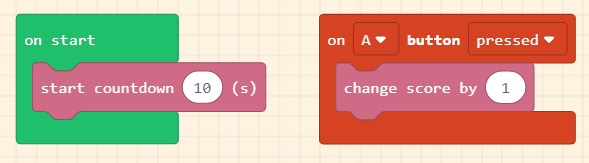
This example has two variables both of type number. 'countdown' provides a count down from 10 to zero i.e. 10, 9, 8 ... 0. The second variable is 'score'. Perhaps by looking at the code you guess the function and behaviour of this variable.
Comments that describe function and behaviour
A comment for the on Start block above might be "When program starts this block will execute. It starts a countdown from 10 to zero. The countdown runs in seconds".
6. Follow conventions for the chosen programming language (Merit)
Coding Conventions
Coding conventions cover good practice when writing programs. These conventions help the coder to be organised, and also help other coders who might like to understand the program easily.
Some convention taught in this course are:
SETTING a variable to a value happens at the beginning of a group of blocks or program.
Using lowerCamelCase for naming.
Formatting code so that it doesn't get disorganised and messy.
Using functions where possible so that the code is easier to understand.
Achieved with Merit Grade: requirements 1- 6 are all that is necessary for an achieved with merit grade. A quality outcome should have been produced, that has been informed by feedback and the thoughtful application of programming so implications have been taken into account.
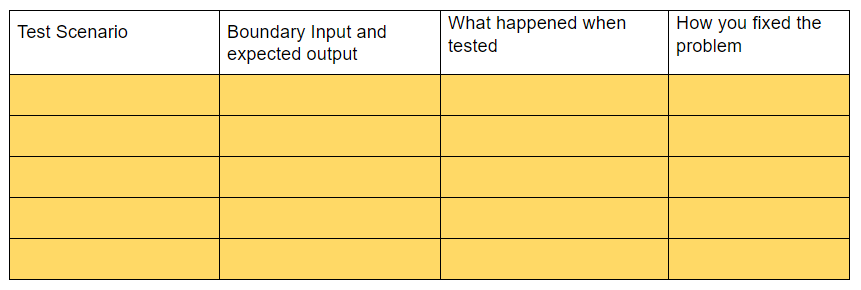
7. Testing and debugging the program in an organised way to ensure that it works on expected and relevant boundary cases (Merit)
Boundary Test Cases
You can only test for boundaries if they are built into your program. Boundaries occur when the programmer looks to design a better program. One that stops the program crashing or becoming difficult to use when something unpredicted occurs.
An example might be restricting how a sprite moves so that it doesn't confuse the user. Upper and lower limits to increases and decreases is speed might be another example. In the assessment for is a location for boundary tests.
8. Ensuring that the program is a well-structured, logical response to the task (Excellence)
Well-structured and Logical
The uses of functions to help break up large chunks of code is desirable. The way the program is structured makes sense and this helps to understand the code.
Logical can refer to code that does what is required in a simple, and elegant way.
9. Making the program flexible and robust (Excellence)
Example of ways of making a program flexible and robust include:
● using methods, functions, procedures, actions, conditions and control structures effectively
● checking input data for validity
● correctly handling expected, boundary and invalid values
● using constants, variables and derived values in place of literals.
Input validity means to check that the player or user is doing something correctly. It might be a number is required but the user enters a letter. The program will then correct the player and say 'Please enter a number' and give them another chance to correctly enter the value.
A literal is the actual value of something. These can be put into programs e.g. 3.141 could be used for the literal value of pi.
10. Comprehensively testing and debugging the program (Excellence)
There are few if any errors in your programs operation. There are extra expected test cases recorded in the assessment document. They should be in the green area under 'Expected' area of testing.